


CARROT Weather
2.41.02K Reviews
App Specs
- Version
- 2.5.2
- Updated On
- License
- Free
- Downloads
- 500,000+
- Developer
- Grailr LLC
- Categories
- Weather
- Platform
- Android, iOS
Screenshots
 Analysis by AppCompare
Alright, folks, let’s dive into one of the quirkiest weather apps on the market: CARROT Weather. If you’re tired of the usual bland weather forecasts, this app is here to spice things up. Now, I've spent some quality time with it, and I'm excited to share the ins and outs. So, grab your umbrella or sunscreen – you never know what CARROT will throw at you!
Why the Personality Matters
That humor is more than decoration: it gives routine forecast-checking a bit of character, which can make the app enjoyable to open even when the weather is unremarkable. The joke is also the first thing a new user should judge for themselves. If you want a neutral tool that tells you the conditions without commentary, the central appeal may feel like unnecessary noise rather than a welcome change.
I would treat the personality as a bonus, not as a reason to trust a forecast. A sharp line can make a rainy morning memorable, but it cannot tell you whether a route is safe or whether an outdoor plan needs to change. For those decisions, I look at the actual conditions and timing, then use the humor as a pleasant extra.
First Impressions Matter
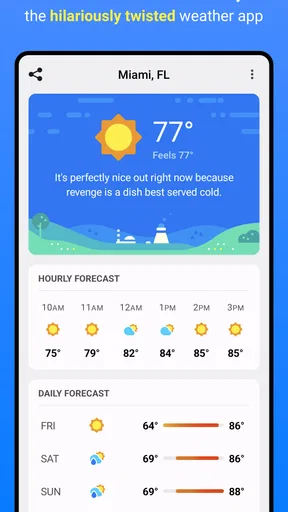
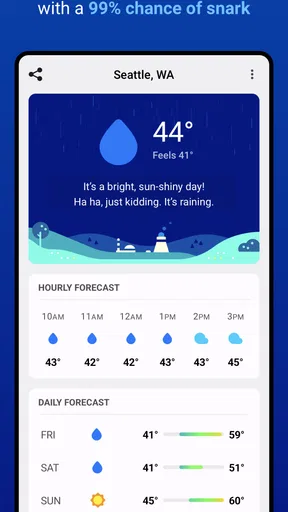
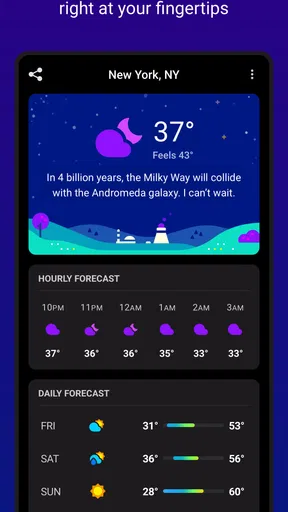
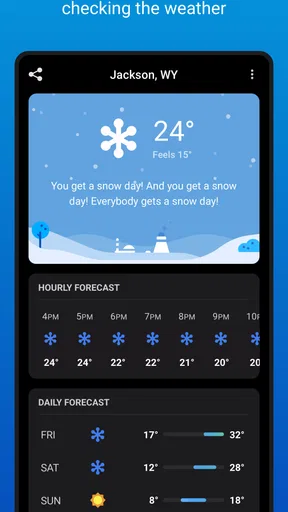
From the moment you open CARROT Weather, it’s clear that this app isn’t your average weather tool. The interface is clean but packed with personality. You’re greeted by witty comments and sarcastic remarks that are bound to make you chuckle. It’s like having a weather forecaster with a sense of humor right in your pocket. This quirky AI even has a personality setting, so you can dial up or down the snarkiness. Personally, I love cranking it up for a good laugh!
Features That Stand Out
Now, let’s talk features. This app isn’t just about jokes; it’s a serious weather app with robust features. It delivers hyper-local weather data, meaning you get precise forecasts tailored to your exact location. This is super handy if you need to dodge rain showers or plan a picnic. The accuracy is impressive, and it updates frequently to keep you in the loop.
Another cool feature is the ability to customize the interface. You can choose what data you want to see, whether it’s humidity levels, UV index, or wind speed. It’s like building your perfect weather report. And let’s not forget about the fun achievements you can unlock – it’s a little game within the app that rewards you for exploring different features and settings.
Make the Screen Work for You
Customizing the weather view is most useful when you decide what you actually check before heading out. If wind matters more than UV for your commute, put the information you care about where it is easy to scan. For a long walk or outdoor lunch, humidity and UV can be more relevant. I’d start with a small set of useful details rather than filling the screen with everything; a crowded forecast can slow down the quick check this kind of app should make easy.
Worth Reading Before You Choose

EA SPORTS FC Mobile 26 Is a Bigger Football Game, but It Takes Time

Flipboard Shows What News Apps Must Do Beyond the Feed

Switching to Android Auto Means Rethinking Your Driving Routine

Google Calendar Makes a Crowded Week Easier to Manage

Ludo King Makes the Most of the Minutes Between Plans

Baby Panda World Brings Quick Play to Modern Phones, but Its Game Library Feels Busy
The achievements can also nudge you to explore settings you might otherwise ignore. I’d use that as a low-stakes way to learn the interface, not as a reason to spend time chasing every unlock. A weather app earns its place by helping with decisions, so the useful test is whether your chosen layout lets you answer practical questions quickly: do I need a layer, should I carry an umbrella, and is wind likely to change the feel of the day?
What’s the Forecast?
The weather forecasts themselves are detailed and easy to read. You can view hourly, daily, or even long-term forecasts. The radar map is interactive, allowing you to track storms and weather patterns in real time. This is particularly useful if you’re planning outdoor activities or hitting the road.
One of the standout aspects is the integration with other platforms. You can sync CARROT Weather with your Apple Watch, which is a game-changer for quick glances at the weather. Plus, it plays nicely with Siri, allowing you to ask for forecasts hands-free. The app also supports a range of data sources, so you can choose the one that you trust the most.
Putting the Forecast to Work
For an ordinary weekday, I’d use the hourly view before leaving home rather than relying only on a daily summary. A day can look generally fine while a short spell of rain changes whether I walk, cycle, or take a jacket. If I’m making plans several days ahead, the longer outlook is helpful for choosing a likely good window, but I’d check again closer to the event before treating it as settled.
The radar is best thought of as a tool for watching movement and timing, not a guarantee that a storm will follow a perfectly predictable path. If I’m heading out, I’d compare what the map suggests with the forecast and keep a backup plan for weather-sensitive activities. For a road trip, I’d check before departure and during a safe stop instead of trying to interpret a map while driving. The app is useful for planning; it should not distract from the road or replace local safety guidance during severe conditions.
Platform details matter, too. The Apple Watch and Siri features described here are relevant to Apple users, so I wouldn’t assume those particular integrations carry over to Android. On either platform, the practical question is whether the version available to you offers the workflow you want. If you mainly need a glance at conditions, a phone view may be enough; if you want quick access without opening the phone, compatible integrations can make the habit easier.
Personal Touches
What really sets CARROT apart is the personalization. Not only can you customize the data you see, but you can also tweak the app’s personality. It’s like having a weather app that knows you, and that’s pretty cool. The more you use it, the more it feels tailored to your preferences.
And let’s talk about the design. It’s visually appealing, with vibrant colors and smooth animations. The app is intuitive, making navigation a breeze, even if you’re not a tech whiz. It’s clear that a lot of thought has gone into making it user-friendly without sacrificing functionality.
Choosing a Data Source Carefully
The option to choose among weather data sources is a meaningful trade-off, not just a setting to change for fun. Forecasts can differ, especially when local conditions are shifting, so I’d pick the source whose results have been most dependable in the places I actually visit. I would avoid switching sources every time one forecast disagrees with another; that can make it harder to tell whether a change reflects new information or simply a different model.
A sensible approach is to use one source consistently for everyday planning, then compare when a decision has real consequences, such as arranging an outdoor event. If two views disagree, treat that as a cue to keep plans flexible rather than choosing whichever answer sounds more convenient. This is one reason the app can suit curious weather watchers, while someone who wants a single uncomplicated answer may prefer a simpler forecast screen.
The Quirks and Perks
Of course, no app is perfect. Some users might find the humor a bit much, especially if you prefer a straightforward approach. But that’s the beauty of it – you can adjust the settings to suit your mood. And while the app is packed with features, some of the more advanced ones are locked behind a subscription. But in my opinion, the premium version is well worth it if you’re a weather enthusiast.
One thing to note is that while the app is generally smooth, occasional glitches can pop up. However, updates are frequent, so the developers are clearly on top of things. And hey, no tech is perfect, right?
Price, Fit, and Practical Limits
As a free weather app, it is easy to try without making a purchase first, but some advanced features require a subscription. The available in-app purchases range from $1.99 to $19.99 per item, so I’d explore the free experience before deciding whether an upgrade is worthwhile. The right choice depends on whether the extra tools solve a problem you have; paying simply because a feature exists is not a good reason.
Grailr LLC is the developer, and the app has been available since July 10, 2018. It is currently version 2.5.2 and requires iOS 8.0 or later. It is rated for Everyone. Its average rating is 2.5 from around 3K ratings, with around 1K written reviews, and it has over 500K installs. Those figures suggest a sizeable audience but also a mixed response, so I would not assume the experience is flawless just because the feature list is appealing.
Compared with the standard weather app that comes with a phone, CARROT’s appeal is its combination of a customizable display, multiple forecast views, radar, and a distinct voice. A basic built-in app may be the better choice if you only want a quick temperature check and prefer the fewest settings. A dedicated weather service may suit you better if your priority is a plain, serious interface or a particular source you already trust. CARROT makes the most sense when its personality and tools improve a routine you’ll actually use.
Who I’d Recommend It To
I’d recommend it to people who check the weather several times a day, enjoy customizing what appears on screen, or like having an entertaining voice alongside useful forecast details. It can be especially handy for someone whose plans change with the weather: a commuter deciding whether to walk, a parent planning time at a playground, or a weekend hiker checking conditions before choosing when to set out.
It is less suitable for anyone who finds sarcasm irritating, wants the simplest possible forecast, or expects a weather app to make decisions for them. If you need dependable information for a high-stakes situation, use appropriate local alerts and official safety advice as well. CARROT is a planning companion, not a substitute for those sources.
For a realistic morning routine, I’d glance at the daily outlook first, then check the hourly forecast before leaving. If rain appears around the time I’ll be outdoors, I can adjust my departure or pack a waterproof layer. I’d keep the screen focused on the details that affect that decision and revisit the radar only if conditions look unsettled. That workflow gets more value from the app than opening it repeatedly just to read another joke.
Overall, CARROT Weather is more than just a weather app; it’s an experience. It’s perfect for those who appreciate a bit of humor in their daily routine and want a weather app that’s both fun and functional. So, whether you’re planning your next adventure or just trying to figure out if you need a raincoat, CARROT’s got your back. Give it a try – you might just find yourself checking the weather more often, just for the laughs!
Pros
- Accurate and detailed forecasts.
- Engaging and humorous interface.
- Customizable notifications.
- Wide range of weather data.
- Integration with smart devices.
Cons
- Subscription required for full features.
- Interface may be too playful for some.
- Limited free version access.
- Occasional data refresh delays.
- Some features need manual setup.
FAQs for CARROT Weather
What features make CARROT Weather unique compared to other weather apps?
CARROT Weather stands out with its quirky, sarcastic AI personality that delivers weather updates in a humorous way. Apart from standard forecasts, it offers detailed meteorological data, customizable widgets, and a variety of themes. Users can also unlock achievements and secrets, adding a gamified element to the weather-checking experience.
Does CARROT Weather require a subscription for full functionality?
While CARROT Weather offers a free version with basic features, a premium subscription is required to unlock advanced features such as additional data sources, hyper-local forecasts, notifications, and customization options. The subscription enhances the app's functionality and provides a more comprehensive weather-tracking experience.
How accurate are the weather forecasts provided by CARROT Weather?
CARROT Weather sources its data from reputable providers like Dark Sky and Apple Weather, ensuring high accuracy for its forecasts. The app offers hyper-local weather predictions, allowing users to receive precise weather information tailored to their specific location. Users report a high level of reliability in its predictions.
Can I customize the interface of CARROT Weather to suit my preferences?
Yes, CARROT Weather offers extensive customization options. Users can adjust the app's theme, change the voice's personality settings, and modify the layout of weather data. Widgets can also be tailored to display different types of information, allowing users to personalize the app to match their style and preferences.
Is CARROT Weather available for both Android and iOS devices?
CARROT Weather is available on both Android and iOS platforms, providing seamless integration across devices. The app is designed to function optimally on a variety of devices, ensuring that users on either platform can enjoy its full range of features and humorous interactions without any compromise.


